
There are a few components that are needed for a Membership. These include Type(s) and Length(s). Both Membership Types and Lengths can be added/edited from the Memberships tab in the lefthand navigation.
Membership Types
Membership Types define the parameters for purchasing a membership. Create Membership Types according to the applicable purchasing options as defined by your department. Membership Types are assigned to the Membership program. Examples/suggestions include: Individual, Family, Senior.
Membership Types cannot be deleted if they have memberships associated to them.
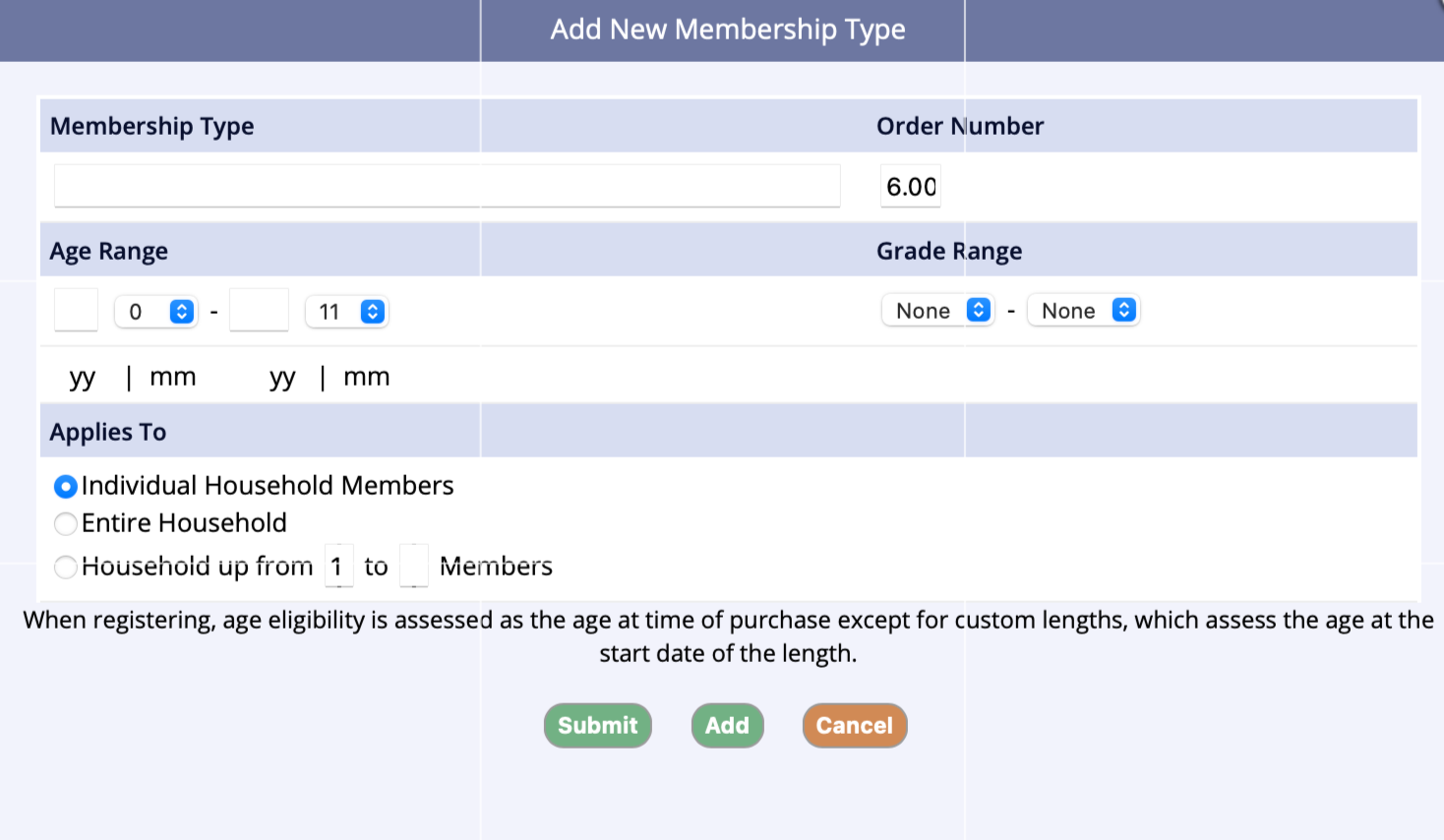
Field(s):
- Membership Type (required) - Enter the name of the membership type
-
Age Range (optional) - Enter the from and through age for the membership type
- Assign an age or grade range, not both, to avoid conflict
- If the “through” age is unlimited, leave blank
- Assign an age or grade range, not both, to avoid conflict
- Order Number (required) - Identifies the position in the listing of types
Household up to __ Members (defined number of family members within an account)
Membership Lengths
Membership Lengths identify the duration of the membership program. There are several length options available. Membership Lengths are assigned to the applicable membership program.
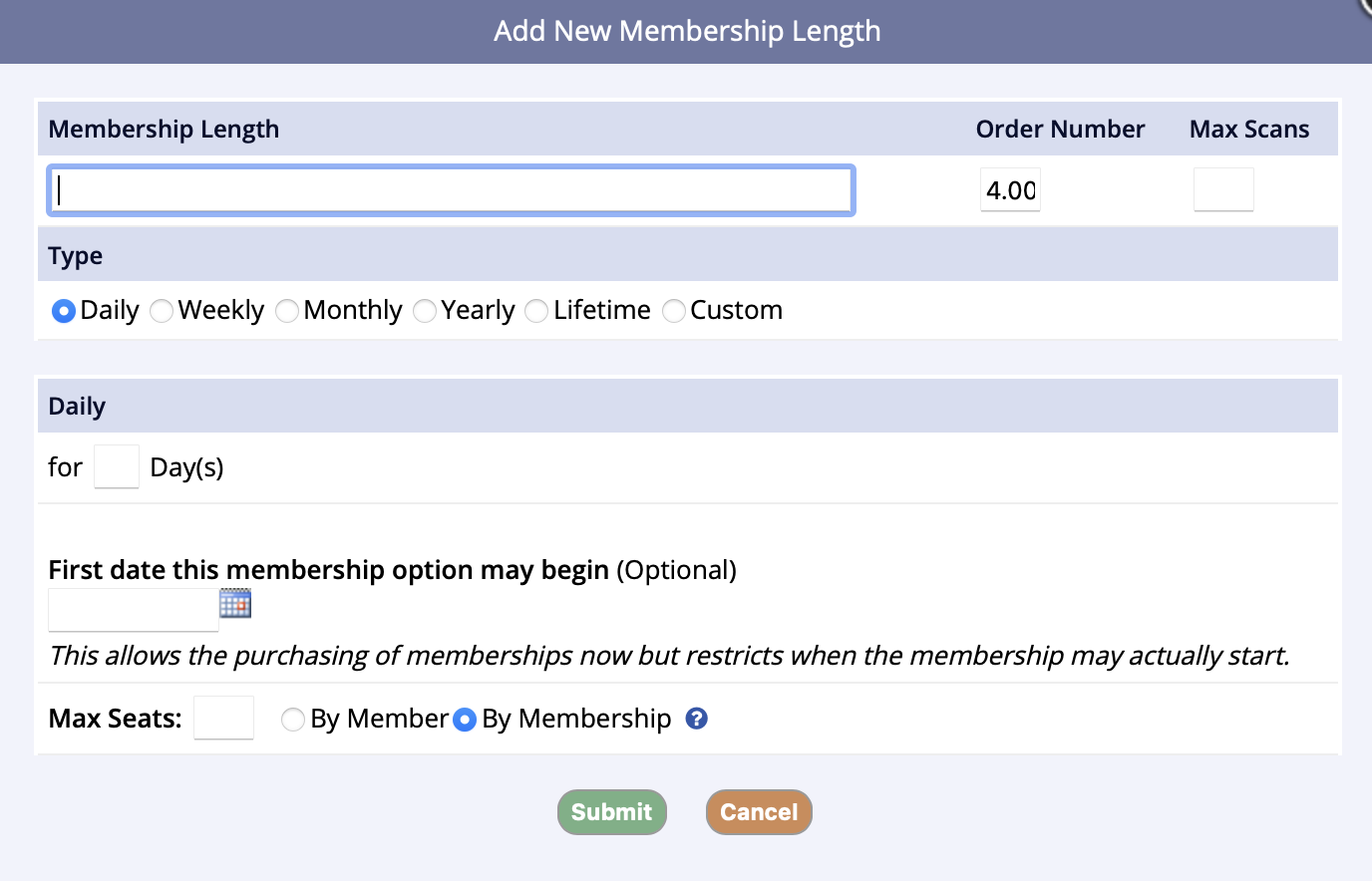 Field(s):
- Membership Length(s) (required) Enter name of the Membership Length. Suggest creating a standard naming convention, for example: Monthly Standard or Monthly Custom
- Order Number (required) Identifies the position in the listing of lengths
-
Max Scans (optional) Enter a numeric value if the membership length has a defined number of scans, i.e. punch passes
- If this field is populated, each scan (manual or via scanner) will reduce the number of available visits left on the members pass
-
Max Seats (optional and only available on Daily or Custom Lengths) Max Seats are restricted to matching Start and End Dates of memberships being purchased
- This setting will limit the number of members/memberships per membership type assigned, it will not limit across membership types
- i.e. If you set Max Seats to 50 by member and have this length assigned to City Pool Youth Membership and City Pool Adult Membership, the result will be that up to 50 members can register for the City Pool Youth Membership and another 50 members can register for the City Pool Adult Membership
- This setting will limit the number of members/memberships per membership type assigned, it will not limit across membership types
-
Type (required) This field identifies the duration of the Membership Length
- Daily: Select the radio button for Daily. Enter the number of days in the For ___ Day(s) field
-
Weekly*: Select the radio button for Weekly. Select Start at Beginning of Week ___ for xx Week(s) if the length begins on a specific day of the week
- Select Starts On Date to be determined at Purchase for xx Week(s) if the membership is active at the time of purchase
- Enter the number of weeks the length is valid for
-
Monthly*: Select the radio button for Monthly. Select Start at Beginning of Month ___ for xx Month(s)
- Select Starts On Date to be determined at Purchase for Month(s) if the membership is active at the time of purchase
- Enter the number of months the length is valid
-
Yearly*: Select the radio button for Yearly
- Select Starts On Date to be determined at Purchase for xx Year(s) if the membership is to be activated by the date decided at the time of purchase
- Enter the number of years the length is valid
- Select Starts On Date of Purchase for xx Year(s) if the membership is to be active at the time of purchase
- Enter the number of years the length is valid
- Starts on Month / Day for xx years, selection if membership begins on same month / day each year
- Custom: Select the radio button for Custom. Populate the Starts on and Ends on date fields.
*Weekly, Monthly and Yearly Types have additional type option selection about the duration.
Standard - Basic type occurs for the number of weeks, months or years indicated on the Type and expires after that duration.
Subscription - A membership subscription is a recurring payment for a membership. It can be in weekly, monthly, or annual intervals. Once the subscription is set, the credit card will be charged at the beginning of the interval, such as Sunday for weekly, the first of the month for monthly, or the first of the year for annual intervals. The start date of the membership must be at least a day away from the date of the registration. (Replaced by Payment Plans in 2025)
Extension - A membership extension is a recurring billing for a membership. It can be in weekly, monthly, or annual intervals. Once the extension is set, an adjustment will be applied at the beginning of the interval, such as Sunday for weekly, the first of the month for monthly, or the first of the year for annual intervals. The start date of the membership must be at least a day away from the date of the registration.
Expiration dates of a membership can be extended in bulk after registrations. Refer to Extend Membership Expiration Dates for more information.
Modifications can be made to individual activation and expiration dates after registration. Visit Modify Membership Effective Dates to learn more on this process.